 TikQo


About the game
Talk It Out turns your TikTok LIVE into a talking 3D character. The character on stage becomes the host of your stream: it reads comments, calls viewers by name, reacts to gifts, and starts the conversation itself during silence. The stream keeps going whether you're at the camera or not. CHARACTERS Goku, Spider-Man, SpongeBob, Squidward, Mad Scientist, CJ, Nico Robin and Rias come ready to go. Each has their own personality, speaking style and Turkish voice. Asked about their age, where they live, favorite food, fear or best friend, they give the same in-character answer every time. If you want, you can write the character's personality and speaking style yourself from the menu. VOICE REPLIES TO COMMENTS The character answers every comment with AI and calls the viewer by name. The reply is both spoken aloud and written on screen as subtitles; the mouth matches the voice, eyes and eyebrows move with the emotion, and the character gestures while talking. Who it is replying to shows on screen with the viewer's name and comment. Profanity and banned words are filtered; you can add your own banned words too. GIFTS AND REACTIONS Viewers control the character with gifts: move their question to the front, make the character angry, cheer it up, make it sad or calm it down; have it roast them, ask for a compliment, tell a joke, dance, or change the character or the background. On big gifts the camera zooms in and a big reaction comes with sparkles and shaking. Followers, people who share the stream and those who shower it with likes are welcomed by name; anyone who writes "katıl" in the comments gets a greeting. You can change what each gift does from the mapping screen in the launcher or from the Gifts page in the game. SCENES A night city studio, underwater, space, a beach at sunset, a neon game room and a neighborhood street are ready. Each character can move to their own scene (SpongeBob underwater, CJ in the neighborhood), the scene can change at set intervals, or you can use your own picture as the background. MOVES AND EMOTIONS 59 moves: speaking gestures like waving, clapping and laughing, 4 kinds of dance, and moves unique to each character (Goku's Kamehameha, Spider-Man's web shot, Rias's hair flip…). Between conversations the character acts like a real streamer: sips coffee, checks their phone, fixes their hair; now and then sneezes, hiccups, stumbles. 7 emotions (calm, angry, sad, cheerful, sarcastic, scared, excited) are chosen by hand or change on their own with the mood of the stream. MINI GAMES AND GOALS Trivia, a "1 or 2" poll, number guessing, riddles and fastest typer games get viewers involved in the comments; the winner is announced by name, and points are collected on the daily leaderboard. Like and gift goals progress on screen; when full, the character dances, tells a joke, showers everyone with compliments or throws a huge celebration. AUTOPILOT When no comments come in, the character doesn't go quiet: it tells stories, brings up chat topics, calls out to silent viewers, starts mini games, and announces goals and leaders. The character can change at set intervals or by viewer vote. AI AND VOICE INCLUDED AI and natural Turkish character voice are included for 1 hour every day; no key, account or setup is needed. The time runs while the game is connected to TikQo and chat isn't paused, and it renews 24 hours after first use; the remaining time shows in the menu. When time runs out, the character keeps talking with ready-made replies, ready-made voices and subtitles; the stream is never empty. EASY TO USE The simple menu opened with Esc has three pages: Stream (character, background, emotion, auto chat, making the character say any sentence you want, volume), Gifts (mappings and test buttons), Settings (display, personality, banned words, mini games, goals). The screen uses a vertical 9:16 TikTok layout, and horizontal can also be selected; TikTok's comment and button areas are left empty. Graphics quality is adjusted for weaker and stronger computers. NOTE TikTok may restrict automatic streams where the streamer is away from the screen for a long time; it's recommended that you join the stream from time to time. Comments are sent to the AI through the TikQo server only to generate replies and are not used for model training.
What does each gift do?
Default settings. You can change the triggers and amounts on the Game Actions page in the launcher.
| What does the viewer do? | What happens in the game |
|---|---|
| Join The character greets viewers who type 'katıl' in chat, in character. |
| Follow greeting The character welcomes the viewer who follows, in character (once per viewer). |
| Share thanks The character thanks the viewer who shares the stream (once per viewer). |
| Like reaction When a viewer's likes reach the threshold, the character gives a short reaction. |
| Make angry The character talks angrily for one minute. |
| Cheer up The character talks cheerfully for one minute. |
| Make sad The character talks sadly for one minute. |
| Calm down The character talks calmly for one minute. |
| Prioritize my question The viewer's comment jumps the queue; the character answers it right away and at length. |
| Change character The character on stage switches to the next one; the new character introduces itself. |
| Roast me The character takes a harmless, playful jab at the viewer. |
| Compliment me The character showers the viewer with over-the-top compliments. |
| Sing a song The character makes up and sings a short song for the viewer. |
| Tell a joke The character tells a short, clean joke. |
| Dance The character dances for the viewer. |
| Change background The stage background switches to another theme (underwater, space, beach…); the character reacts to the new place. |
| Big reaction The camera zooms in; the character reacts big with a flood of praise and a dance for the viewer. |
How to buy
- Press Buy. If you are not signed in, the sign-in page opens first.
- Pay by card on the secure checkout page (USD). The game is added to your TikQo account right after payment.
- Log in to the launcher with the same account; the game downloads and you're ready to go live.
System requirements
See the download page for details.
Talk It Out FAQ
How do you play Talk It Out?
Talk It Out is a game that viewers control with gifts, likes, follows and comments during your TikTok LIVE. You open the game on your Windows PC with TikQo Launcher, type your TikTok username and connect it to your stream. To let viewers see the game, you add the game screen to your stream from your PC.
Can viewers join Talk It Out for free?
Yes. Any viewer who comments katıl joins the game for free. Sending gifts is not required; gifts just create bigger effects in the game.
What does each gift do in Talk It Out?
With the default settings, 13 different gifts have an effect in the game. The cheapest is the 1-coin TikTok: Make angry. The most expensive is the 1000-coin Galaxy: Big reaction.
The full list is in the table on this page. You can change the triggers and amounts on the Game Actions page in the launcher.
How much does Talk It Out cost?
Talk It Out costs 1.499 TL. The game you buy is added to your TikQo account and shows up in the launcher. If you want to play several games, take a look at the packages as well.
Can Talk It Out be played on a phone?
The game runs on a Windows 10 or 11 (64-bit) PC; Mac and phone-only setups are not supported at the moment. Even if you start your stream from your phone, the launcher passes interactions to the game, but to let viewers see the game you need to add the game screen to your stream from your PC.
Similar games
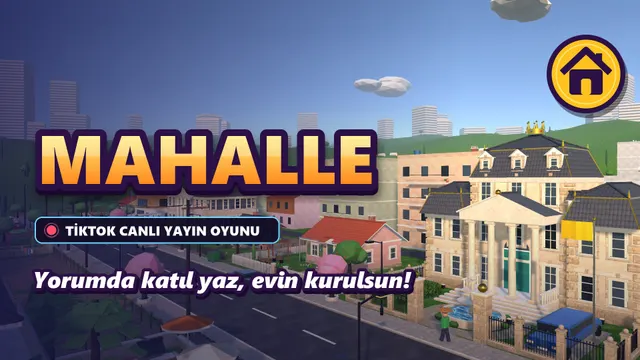

Neighborhood
Every viewer gets their own house in a living neighborhood; as support comes in, the shack turns into a mansion.
- 8 levelsShack → Cabin → Detached house with garden → Two-story → Modern duplex → Villa with pool → Luxury mansion → Estate
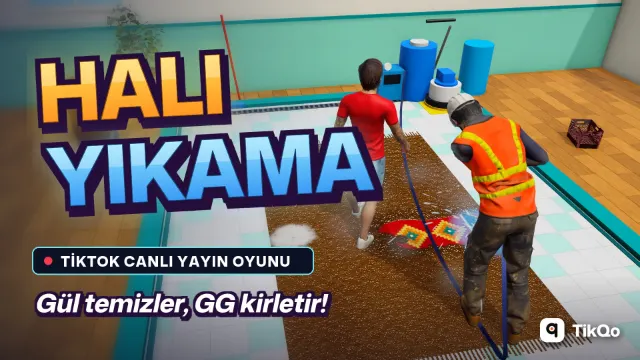

Carpet Wash
You wash the carpet; viewers send Roses to clean it, or send GG to land on the carpet with muddy feet!
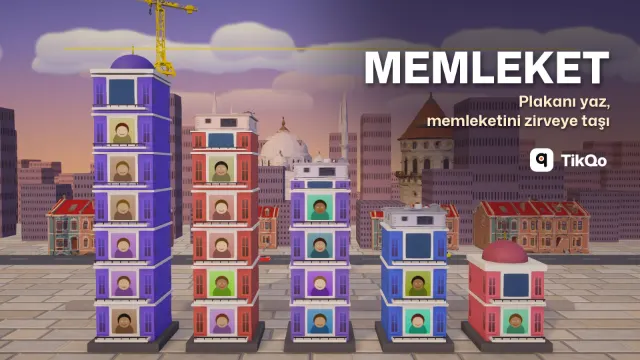
Memleket
Viewers type their license plate code and add bricks to their hometown's tower; the first province to reach the clouds wins the round.
- RankHemşehri → Usta → Ağa → Bey, next to their name on the event card